Blue-green prepares a new version alongside the current one and lets you switch traffic between them. Canary starts by sending only a small portion of traffic to the new version to observe it before expanding exposure. You can combine these ideas: two sets of application instances and a progressive traffic shift.
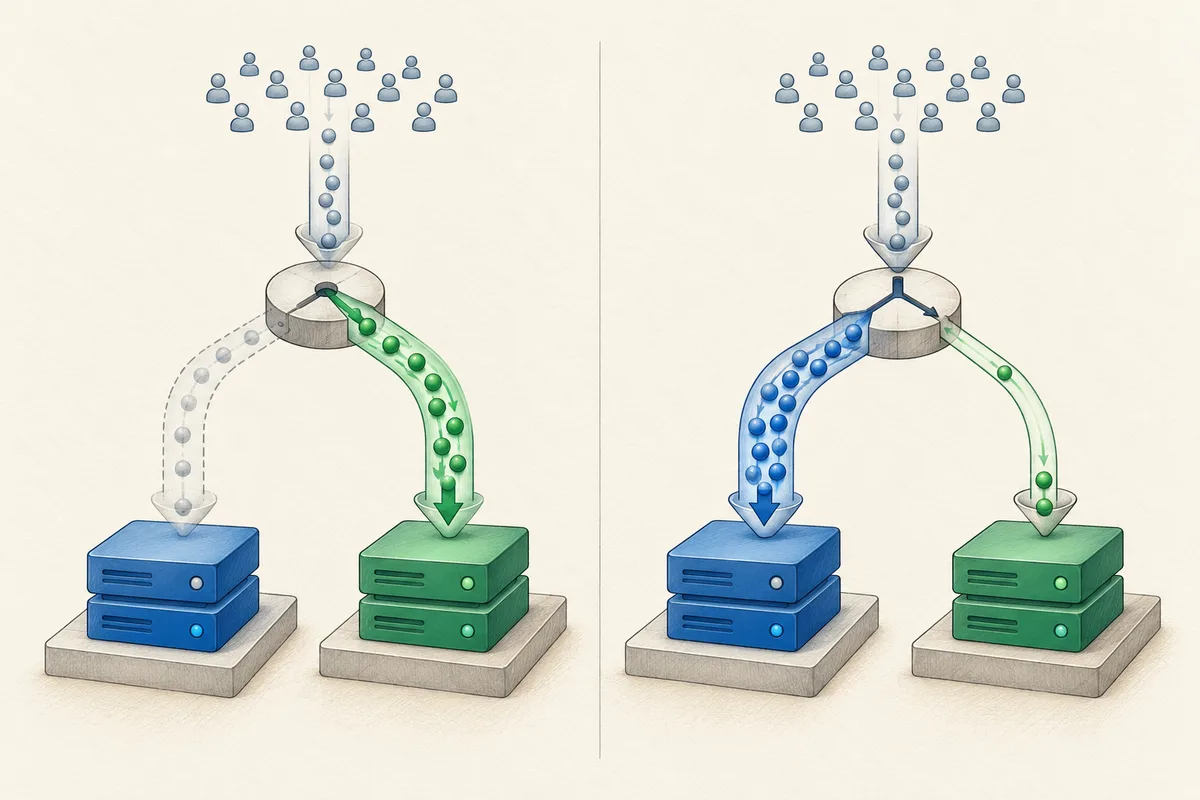
Left, blue-green after cutover: traffic reaches the new version. Right, canary during evaluation: both versions serve traffic, but the new one receives a small portion. Blue represents the previous version and green the new one.
Blue-green
An instance is a running copy of the application, such as a container. Blue-green maintains two interchangeable sets of instances. The current version keeps serving while the new one is prepared and checked; a router or load balancer can then direct incoming requests to the new destination.
This requires additional capacity during the transition. Dependencies, sessions, and existing connections also need checking before the switch.
Canary
The new version receives a small portion of real traffic. Errors, latency (response time), and completed operations are observed by version to decide whether to expand exposure or stop the change.
For example, when the canary receives only 5% of traffic, its errors may disappear in the global average. Evaluation needs signals from that version, representative traffic, and an explicit criterion for progressing or stopping.
For the checkout fix, compare calculation errors and completed orders for the new version with the previous one. Define the acceptable error level and observation period before starting. If the new version breaches that limit, stop expansion and follow the recovery plan; a quiet dashboard with too few orders is not enough evidence to proceed.
Rolling updates and rollback
A rolling update replaces instances gradually. Having one new instance among several old ones does not guarantee a precise traffic split or a deliberate canary evaluation.
Returning traffic to the previous version can contain a failure if that version is still ready and compatible. It does not reverse writes, charges, or an incompatible migration. Both versions may share a database, queue, or external provider, so recovery and data compatibility also need checking.