A container image is a packaged filesystem that includes an application and the dependencies it needs, such as libraries and a language runtime. A container is an instance created from that image, with its own execution state. The image is the package; a running container executes its processes.
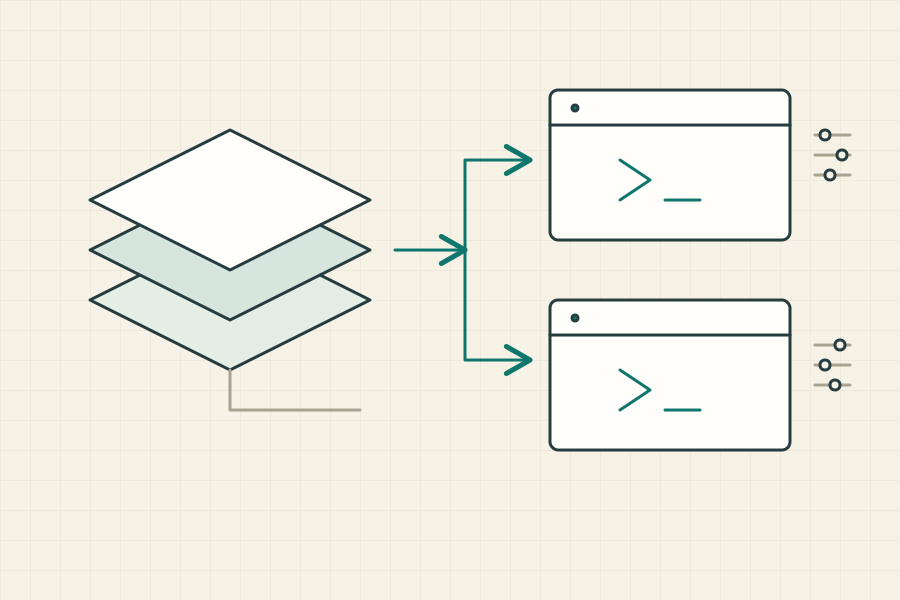
One identified image can create multiple containers. Each instance still needs resources, configuration, and access to the correct services and data.
Build an image, run a container
A dependency is software the application relies on. A language runtime, such as Python, executes its code. Building an image packages the application with those dependencies. A container runtime creates and manages containers from images; Docker provides familiar tools for this workflow.
A registry stores images so other machines can retrieve them. An image digest identifies exact image content; a tag is a convenient name that can be moved to different content. Recording the digest helps trace what was tested and deployed.
What becomes more consistent?
For the checkout fix, build an image containing the new code and its dependencies, test it, and use the same image in production with production configuration. This reduces surprises caused by installing different dependency versions on each machine.
Containers are one way to deliver software, not a requirement for DevOps or CI/CD. Static files, application packages, and virtual machine images can also be tested and deployed. Choose packaging that fits the application.
The image is not the whole environment
Containers depend on a compatible host system and container runtime. They normally share the host's operating system kernel; they do not each contain a complete virtual machine. CPU limits, networking, permissions, and external services can change how the same image behaves.
Supply secrets separately from the image and keep persistent data in deliberately managed storage. Replacing a container should not lose orders. Packaging does not prove correctness: the next step is to integrate changes and check the resulting software through CI/CD.